Effects for E‑Baglama Buy · 49 €

A whole pedalboard, voiced for the e‑Baglama.

The eBaglama turns an electric bağlama into a finished stage sound. It matches the sound to your pickups, transposes like a capo, and runs amps, drives, wah, modulation and reverbs that were tuned for the bağlama’s range rather than borrowed from guitar.

MacWindowsAudio UnitVST3StandaloneiPhone & iPadAUv3
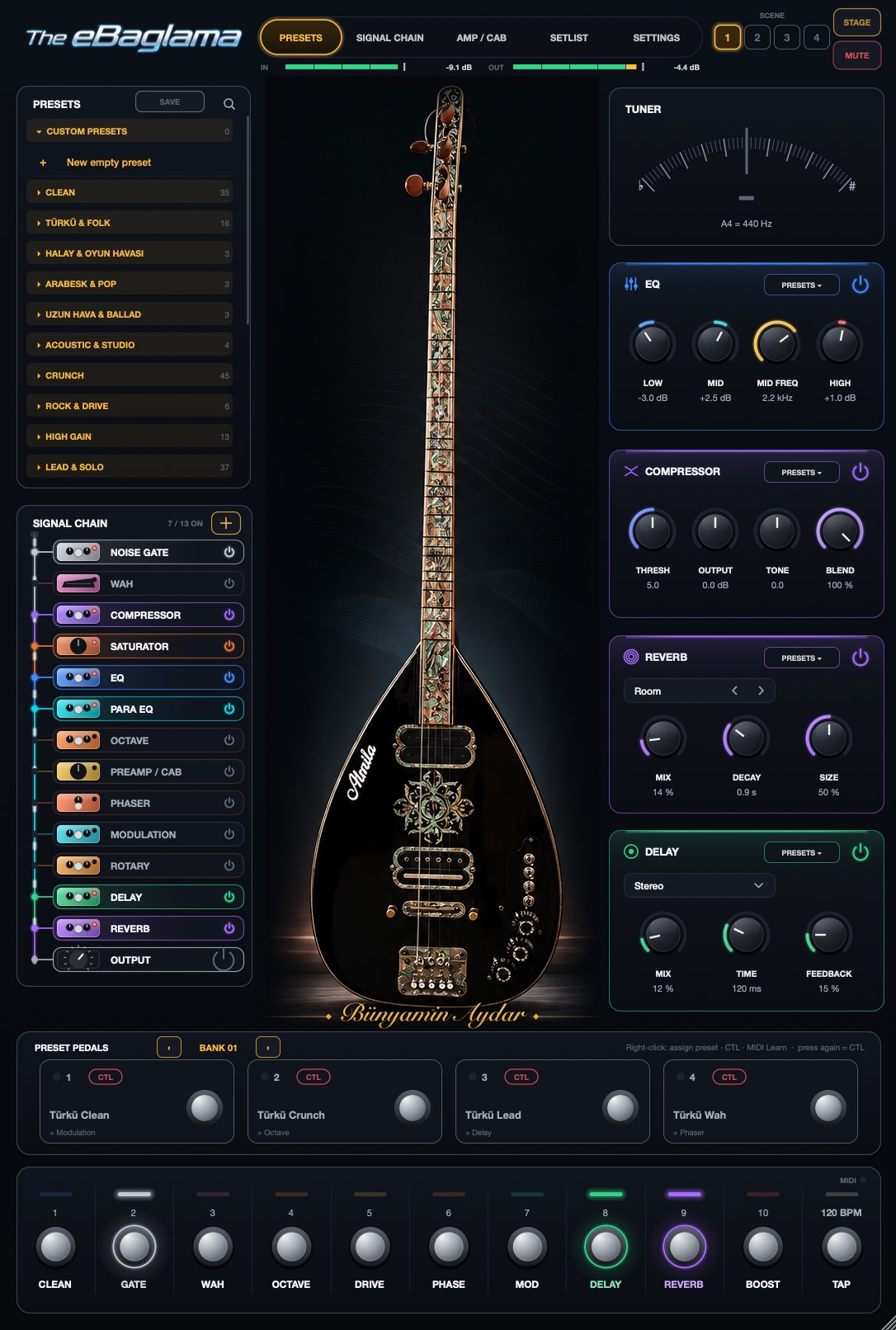
The eBaglama start page in portrait: presets, signal chain, tuner, EQ, compressor, reverb, delay, preset pedals and footswitches
14stages in the signal chain
±12semitones of transpose, before all effects
16preset categories, loudness-matched
40 × 4banks of preset pedals for the stage
Film

See it in 47 seconds.

Sound demo

Hear 12 presets in one minute.

One bağlama through twelve presets of The eBaglama: clean, arabesk, ambient, phaser, flanger, lead, crunch, octave and rotary.

Preset pedals

Switch sounds with your foot.

One press loads a preset, press again and extra effects come in (here: octave). Works with any MIDI foot controller.

Sound

Built around the bağlama.

Transpose without a capo

Two modes for two jobs. Live reacts fast like a pitch pedal: going down, you hear yourself after only 4 to 8 ms, and every pick attack sounds exactly once. Precise takes a little longer but stays perfectly in tune, even with drone strings and melody together.

LIVE · under 2 cent · ~4–8 ms  |  PRECISE · under 0.2 cent · 60 ms

Pickup match

Play for ten seconds. The app learns your pickup and corrects it for every preset, including the nasal peak around 2.2 kHz.

Humbucker or single coil

Amps and drives

Tone stacks modelled on the original circuits, tube stages and a power amp with sag. Six voicings made for bağlama.

14 drives22 preamps11 cabinets

Your own captures

Load two NAM captures of real amps and pedals, and mix two impulse responses. Levels are matched automatically.

.namIR × 2

Reverb machines

Mix, decay, pre-delay, tone, modulation, size and two machine-specific controls.

RoomHallPlateSpringBloomCloudShimmer+7
The app

Everything on one screen.

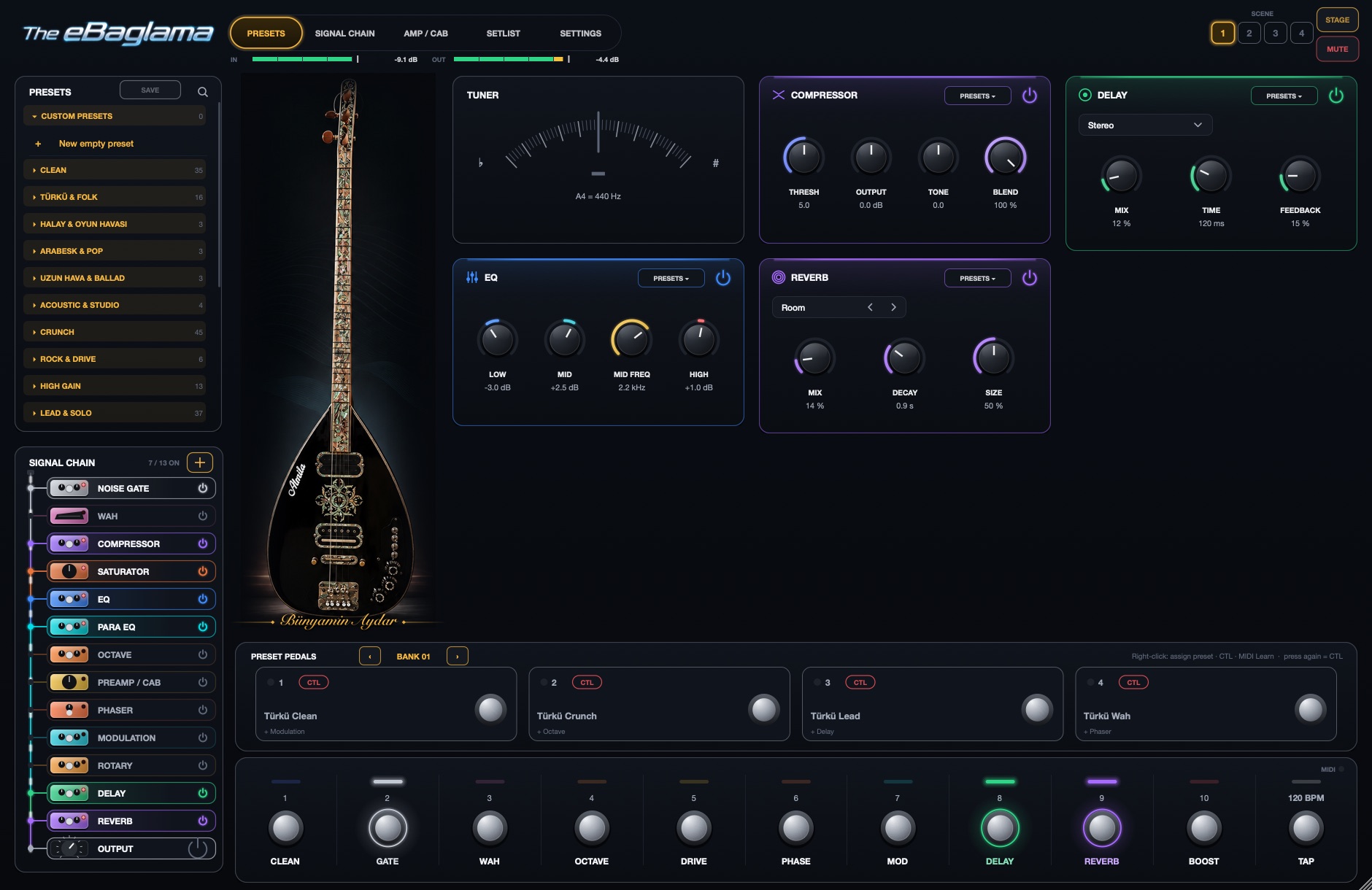
Presets on the left, the chain as a pedalboard, the instrument in the middle, footswitches along the bottom. On the Mac the window works upright or wide; the iPad turns with you.

The eBaglama main window: preset list, signal chain, tuner, compressor, EQ, delay and reverb panels, preset pedals and footswitches

Main window, landscape. Preset “Live Stage”, scene 1.

Video

How it works

The app explained in three minutes: setup, pickup match, presets, transpose, signal chain, amp and cab, EQ, scenes, stage view, setlist and MIDI.

Stage

Made for the gig, not only the studio.

PRESET PEDALSBANK 01
1Türkü Clean
2Türkü Crunch
3Türkü Lead
4Türkü Wah

Every factory bank: clean, crunch, lead, wah. Press a pedal again to switch its CTL effect.

  • Four scenes per songSwitch without a gap. Delay and reverb tails ring out.
  • Setlist and STAGE viewSongs in order, large song and scene name, tuner and switch states readable from a distance.
  • MIDI learn on everythingSeveral targets per controller, calibrated expression pedal, reversible pedal direction.
  • Wah and volume on one pedalWhen the preset has wah on, the pedal drives the wah. Otherwise it is your volume pedal, and it sits before delay and reverb so swells keep their tails.
Presets

Sixteen categories, from folk to high gain.

All factory presets sit at the same loudness, so switching never jumps. Save over a factory preset and restore it at any time.

CleanTürkü & FolkHalay & Oyun HavasıArabesk & PopUzun Hava & BalladAcoustic & StudioCrunchRock & DriveHigh GainLead & SoloAnatolian Rock & FuzzOctave & SynthModulation & FXAmbient & SpaceWah & FunkLive & Stage
Signal chain

From pickup to PA, in order.

Mono in, mono or stereo out, with fixed latency. The only delay comes from oversampling.

  1. Input

    Gain, trim with one-touch input calibration, noise gate.

  2. Pickup match

    Learns your pickup from 10 seconds of playing. Low cut, body, dynamic softening of the nasal peak around 2.2 kHz, shine.

  3. Performance & transpose

    Attack, string noise, dynamics. Transpose ±12 semitones with fine tuning, ahead of every effect.

  4. Compressor & EQ

    Warm tube compression that reacts to your playing: gentle when you play softly, firmer when you dig in. Three-band EQ plus a parametric EQ.

  5. Octave

    −2, −1 and +1 octave. Polyphonic, and the dry signal is not delayed.

  6. Drive, preamp & cabinet

    14 drive circuits, 6 bağlama voicings and 16 amps at 8× oversampling, 11 cabinets or your own IRs.

  7. Boost

    Solo lift from 0 to 12 dB.

  8. Wah

    Expression pedal or auto-wah, six models, including a bass wah with body.

  9. Phaser

    Four-stage orange phaser with Script and Block modes.

  10. Modulation, saturator, rotary

    Chorus, doubler, flanger, vibrato. Tube, tape, transformer and console saturation. A rotary speaker with horn and drum.

  11. Delay

    Stereo, ping-pong, tape. Syncs to the DAW tempo, with tap tempo.

  12. Reverb

    14 reverb types, from Room and Spring to Shimmer and Cloud. Freeze by footswitch.

  13. Feedback guard

    Places narrow notches on frequencies that start to howl.

  14. Output

    Width, mono-compatible stereo, mono for FOH, soft clip, and a safety limiter at −0.5 dBFS.

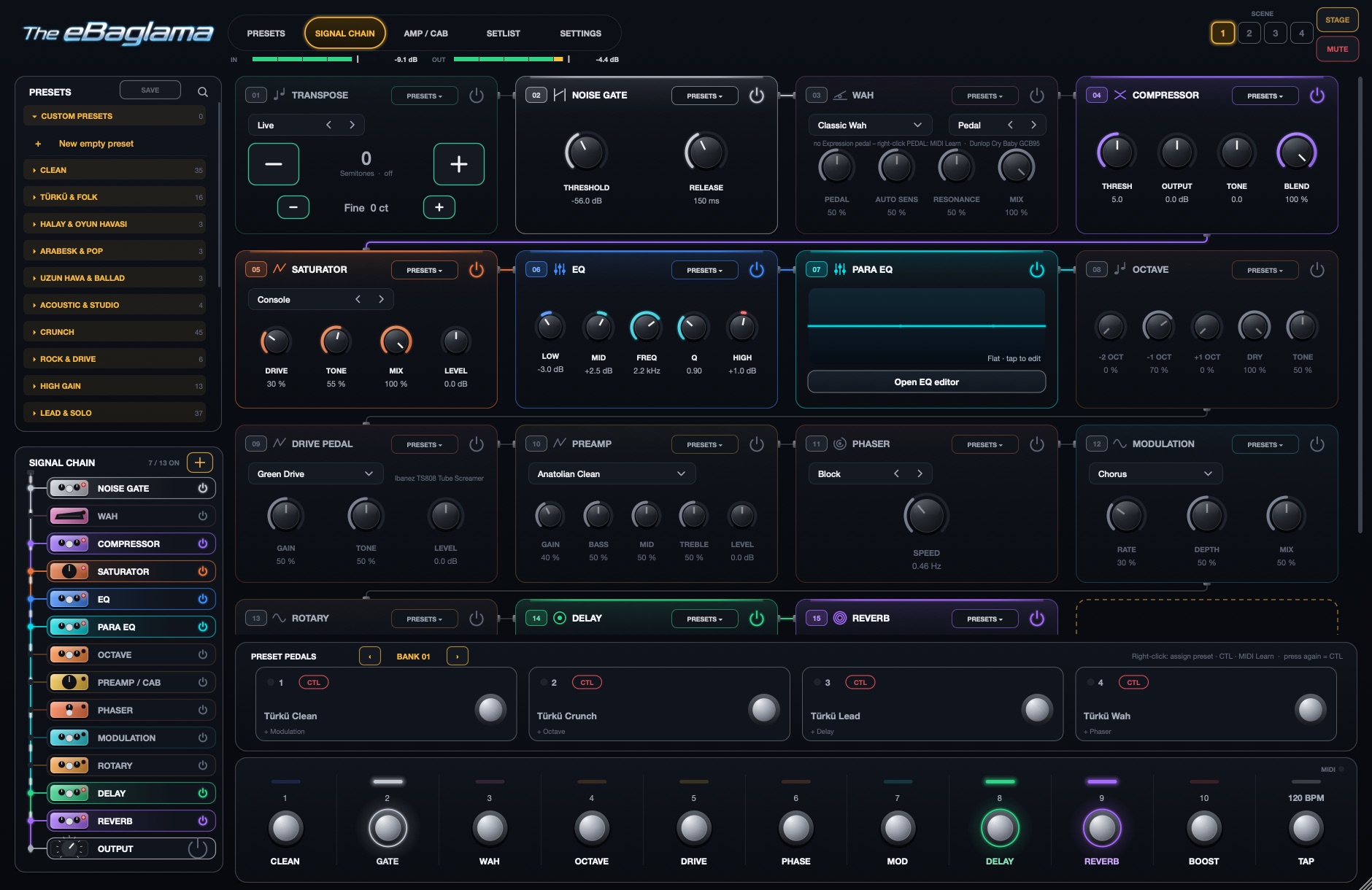
Most effects can be reordered, removed, or split into two parallel paths A and B. The order is saved with the preset and the scene.

Signal chain page showing numbered effect panels linked by cables

SIGNAL CHAIN page: every effect as a numbered panel, cabled in playing order.

Platforms

In your DAW, on stage, in your pocket.

Mac

Available now

Audio Unit for Logic Pro, VST3 for other DAWs, and a standalone app for playing live.

Windows

Available now

VST3 for your DAW and a standalone app with ASIO for low latency. Included in your licence.

iPhone & iPad

On the App Store

A standalone app and an AUv3 plug-in for GarageBand, AUM and Cubasis. Load captures and IRs through the Files app. Free download with a 7-day trial, then a one-time in-app purchase.

14 languages

English, Deutsch, Türkçe, Kurdî, Azərbaycan, العربية, فارسی, Ελληνικά, Español, Français, Italiano, Nederlands, Português, Русский.

The iPhone & iPad version is sold separately through the App Store; the Mac & Windows licence does not include it.

Download on the App Store
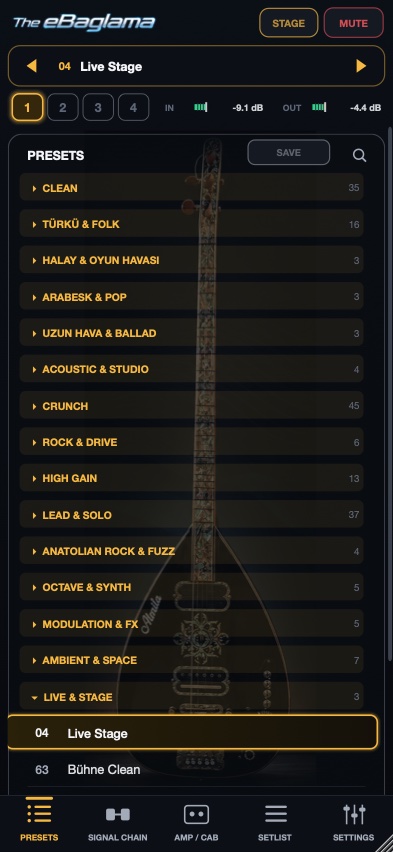
The eBaglama on iPhone: preset list over a dimmed bağlama, tab bar at the bottom
Buy

Get The eBaglama for Mac and Windows.

One licence for Mac and Windows: Audio Unit, VST3 and the standalone app on the Mac, VST3 and the standalone app on Windows. Download right after payment.

Introductory price
49 €79 €One-time purchase. 14-day money-back guarantee.
  • Audio Unit for Logic Pro, GarageBand and MainStage
  • VST3 for Ableton Live, Cubase, Reaper, Studio One and others
  • Standalone app for playing live without a DAW
  • All factory presets, banks and future 1.x updates
  • Install on up to two of your own computers, Mac or Windows
  • VST3 and standalone app for Windows, with ASIO
Buy now · Mac & Windows · 49 €

One purchase, both systems: after payment you get the Mac and the Windows download and one licence key for up to two computers.

macOS 12 or later · Windows 10 or 11, 64-bit · full sound for 7 days, no account needed

Windows may say it protected your PC, because our installer is not signed yet. Click More info, then Run anyway.

Secure checkout by our reseller Lemon Squeezy, who handles payment, invoice and VAT. You receive the download link and your licence key by email; you find them again any time under My Orders.

ManualPDF in English, Turkish or German.
MacmacOS 12 Monterey or later, Apple silicon and Intel.
FormatsAU (Mac), VST3 and Standalone, 64-bit. Mono and stereo tracks.
Audio interfaceAny interface with an instrument input (Hi-Z) for your bağlama: Core Audio on the Mac, an ASIO driver on Windows.
WindowsWindows 10 or 11, 64-bit (x64). VST3 and standalone app with ASIO.
iPhone & iPadiOS or iPadOS 16 or later. Sold separately on the App Store.
Before you buyQuestions about your setup? Write to contact@theebaglama.com.
FAQ

Before you buy.

What do I need?

A Mac with macOS 12 or later (Apple silicon or Intel) or a PC with Windows 10 or 11 (64-bit), and an audio interface with an instrument input (Hi-Z), on Windows with its ASIO driver. Plug in your bağlama, open the app or the plug-in in your DAW, and play.

How does the free trial work?

Download, install, play: the effects for 7 days, with no account and no licence key. After 7 days the app only passes the dry signal until you enter a licence key. Your presets stay.

On how many computers can I use it?

One licence activates on up to two of your own computers, Mac or Windows in any combination. To move to a new computer, free the old one in the app under SETTINGS.

Do I need the internet?

Only once, to activate. After that The eBaglama runs offline, on stage too.

Can I get my money back?

Yes. Within 14 days of your purchase, without giving a reason: write to contact@theebaglama.com with your order number, or reply to your receipt email.

Are updates included?

All 1.x updates are free for owners.

Which DAWs does it work with?

Audio Unit (Mac): Logic Pro, GarageBand and MainStage. VST3 (Mac and Windows): Ableton Live, Cubase, Reaper, FL Studio, Studio One, Bitwig and others. Without a DAW, use the standalone app.

Windows warns me when I install it.

Our installer is not signed with a certificate yet, so Windows shows “Windows protected your PC”. Click More info and then Run anyway. The installer puts the app in Program Files and the VST3 in C:\Program Files\Common Files\VST3.

Is there a version for iPhone and iPad?

Yes: The eBaglama is on the App Store for iPhone and iPad, as a standalone app and an AUv3 plug-in. Download it for free, try the effects for 7 days, then unlock the full version with a one-time in-app purchase. It is sold separately from the Mac & Windows licence. Open in the App Store.

I lost my licence key.

Sign in with your email under My Orders: all your orders, keys and downloads are there.

Help

Crackling or stuttering?

This is usually down to the buffer size or your computer's power setting, not the plugin. These steps help, in this order.

None of this helps? Write to contact@theebaglama.com with your computer model, audio interface, buffer size and the name of the preset where it happens.

Contact

Questions, dealers, press.

Write to us. We answer in English, German and Turkish.